What is being modelled
This chapter explains the concepts behind an MBDlyb model. It covers what each element means, how elements relate, and how the interface turns them into a probabilistic reasoning model. Read it before you start editing models.
Overview
An MBDlyb model is a functional model. The central question is not how the system is built, but what it must do and what it needs to do it. When a piece of hardware breaks, the functions it realizes stop working. Those functions are required by other functions, and so on, until somebody observes the effect, or a test reveals it.
Diagnosis reverses this chain. MBDlyb reasons back from the observed effects to the hardware faults that most probably caused them.
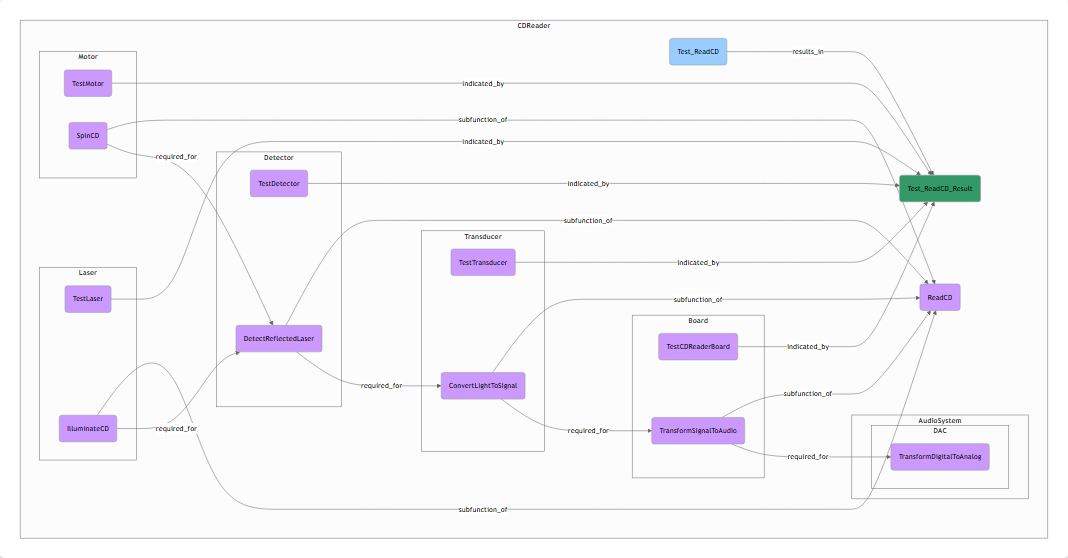
Fig. 15 The diagram of the CDReader cluster of the example model. Purple boxes
are functions, orange boxes are hardware, blue hexagons are tests and green
boxes are test results. The arrows show how failures propagate.
Model elements
The model contains the element types below. The colours are the ones used in the diagrams and in the exported graph.
Element |
Default states |
Meaning |
|
|---|---|---|---|
Cluster |
– |
A container that structures the model hierarchically, for example a subsystem or a module. Clusters contain other clusters and elements. |
|
Function ( |
Ok, NOk |
Something the system does, for example ReadCD or SupplyPowerFromBattery. A function works (Ok) or does not work (NOk). |
|
Hardware ( |
Healthy, Broken |
A physical part that can fail, for example Laser or PowerCable. Each fault (state other than Healthy) has a prior probability. |
|
Operating mode selector ( |
user defined |
A setting of the system that determines which dependencies are active, for example BatteryPower or WallPower. Its states are the operating modes. |
|
Direct observable ( |
Ok, NOk |
Something you can observe without any action, for example a status LED. |
|
Observed error ( |
Absent, Present |
An error message that a function generates and another function
reports, for example |
|
Diagnostic test ( |
– |
An action a service engineer can perform, with a cost, for example Test_PlayRadio or Inspect_Laser. |
|
Test result ( |
Ok, NOk |
The outcome of a test. One test can have several results, and each result can indicate several functions or hardware parts. |
Clusters and names
Every element belongs to exactly one cluster. Its fully qualified name (FQN)
is the path of cluster names followed by its own name, for example
CDRadioPlayer.CDReader.Detector.DetectReflectedLaser. A cluster without a
parent is a root cluster. The diagnoser and design for diagnostics always
work on a whole root cluster.
A common pattern, which the Capella import also uses, is one cluster per component. Such a cluster contains a hardware node with the same name as the cluster, and the functions that this hardware realizes.
Functions
A function is Ok when it is performed correctly. Whether it works depends on its parents:
the hardware that realizes it;
the functions it requires (required for relations);
its subfunctions, if any;
hardware that affects it as a side-effect.
By default a function has the states Ok and NOk. You can define custom
states, for example Ok, Intermittent, NOk for DetectReflectedLaser.
Custom states need a custom conditional probability table (Conditional probability tables). When
child nodes use the default propagation, only the state Ok counts as
working. Every other state counts as a failure.
Hardware and faults
Hardware has the state Healthy and one or more fault states. Each fault has
a prior: the probability of that fault when nothing is known yet (a fault
rate). The default is a single fault Broken with prior 0.01. The prior of
Healthy is one minus the sum of the fault priors.
In the example, CDReader.Detector has two faults: Broken (0.015) and
Dusty (0.04). A dusty detector makes DetectReflectedLaser
Intermittent rather than NOk. The custom CPT of that function captures
this.
Operating modes
Many dependencies only hold in certain situations. The CD player only needs
the CD reader when you play a CD, and only needs the AC power supply when it
runs on wall power. An operating mode selector has the possible modes as
its states, for example Select_BatteryPower_WallPower with the modes
BatteryPower and WallPower.
A required for relation can be limited to one or more operating modes. The relation is then only taken into account when one of those modes is active. A relation without operating modes is always active. In the diagnoser you enter the active modes as evidence. Unknown modes are equally likely.
Observables and observed errors
A direct observable is information that is available without doing a test, such as an indicator. One or more functions or hardware parts are observed by it. It is NOk when one of them fails. It has a false positive rate (FPR, default 0.001) and a false negative rate (FNR, default 0.01). These rates model that an observation is imperfect: it can signal a failure while everything works, or miss an actual failure.
An observed error models an error code that one function generates (yields error) and another function shows to the user (reports error). The functions between them form the error chain. If such an error is Present, the generating function failed, but the functions further in the chain work. Observed errors are created by the Capella import. The editor shows them but cannot create them yet.
Diagnostic tests and results
A diagnostic test is an action with a cost. A test can have several cost types, for example time and money, and the costs are added up. A test produces one or more test results. Each result indicates (tests) a set of functions and/or hardware parts, each with a weight. A result is NOk when one of its tested items fails. Like observables, a result has an FPR (default 0.0001) and an FNR (default 0.001).
The diagnoser proposes tests based on their cost and on how much information their results are expected to give.
Relations
Relations are directed. They point in the direction in which a failure propagates.
Relation |
From → to |
Meaning |
|
|---|---|---|---|
realizes |
Hardware → Function |
The hardware performs the function. If the hardware is broken, the function fails. |
|
affects |
Hardware → Function |
A side-effect: hardware in one cluster disturbs a function in another cluster, for example a hot cooling block. |
|
required for |
Function → Function |
The second function needs the first one. Can be limited to operating modes. |
|
subfunction of |
Function → Function |
The first function is part of the second. A function with subfunctions is a composite function. |
|
observed by |
Function/Hardware → Direct observable |
The observable shows whether the function or hardware works. |
|
indicated by |
Function/Hardware → Test result |
The test result shows whether the function or hardware works. |
|
results in |
Test → Test result |
The test produces the result. |
Relation weights
Most relations have a weight between 0 and 1. The default is 1. The weight
expresses how strongly a failure of the source propagates to the target. If a
parent fails, the probability that the child still works is multiplied by
1 − weight:
weight 1: if the parent fails, the child certainly fails;
weight 0.8: if the parent fails, the child still works with probability 0.2;
weight 0: the relation has no effect.
The effects of several failing parents combine. For a function with a weight-1 realizes relation and a weight-0.8 required for relation, all parents Ok gives P(Ok) = 1. A failing required function gives P(Ok) = 0.2. A broken hardware part gives P(Ok) = 0.
Composite functions
Required for relations must connect leaf functions, which are functions without subfunctions. A relation that starts or ends at a composite function is flagged by the validator, and the required-for matrix offers to repair it. Repairing replaces the relation with relations between the leaf subfunctions.
States and conditional probability tables
Every node in the reasoning model has a conditional probability table (CPT). For every combination of parent states, the CPT gives the probability of each of the node’s states. MBDlyb generates CPTs automatically from the relations and weights, as described above. You only need to provide a CPT when the defaults are not enough. This is the case for custom states, and is required then. See Conditional probability tables.
From model to reasoning
When you open the diagnoser or design for diagnostics, MBDlyb builds a reasoning model from the root cluster:
every function, hardware part, operating mode selector, observable, observed error and test result becomes a variable;
every relation becomes a dependency, with a generated or custom CPT;
cycles in the functional dependencies are cut automatically, because the reasoning model must be acyclic. You can also mark functional exchanges as not required in Capella to control where cycles are cut. The validator reports cycles.
The reasoner can be a Bayesian network (default), a tensor network or a Markov network (see Settings). They give the same results, but one can be faster than another, depending on the model. You can download the generated Bayesian network to inspect it (Downloading the graph and Bayesian network).